Costpoint Cloud Information Center

Using the Help Search
  • Phrase:Returns all topics that contain the exact phrase in the search criteria. Use quotation marks around the phrase.
    Ex."system administration"
  • And:Returns all topics that contain all the words in the search criteria, in any combination. Insert a plus sign between all words in the search criteria.
    Ex.system + administration
  • Or:Returns all topics with any combination of words in the search criteria. This is the default.
    Ex.system administration
For more information:Searching Online Help
Table of Contents
Expand|Collapse
Index
Glossary
Search Results
No search has been performed.

How to Download a File from an Alternate File Location

To download a file:

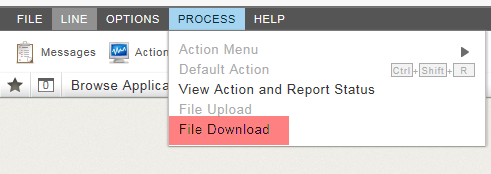
  1. Click Process > File Download.

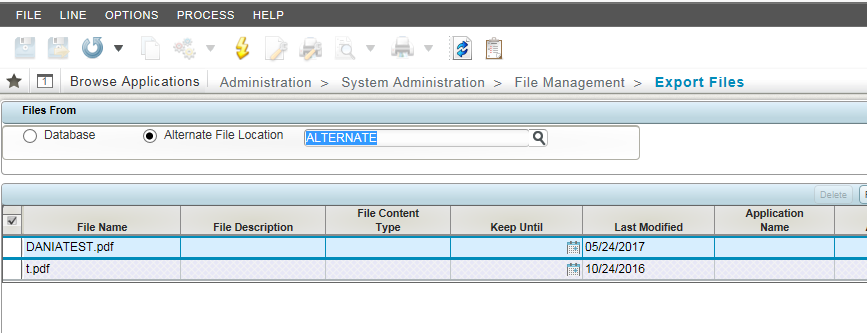
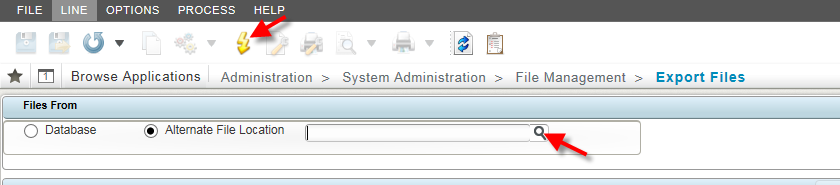
  2. Select an Alternate File Location using the magnifying glass, and click on the yellow lightning bolt icon.

    Files in that folder will display.
Parent Topic: Costpoint
Home
Costpoint Cloud Information Center (CCIC)
Costpoint SaaS Admin and Developer Guides
GovCon Cloud
Enterprise Service Level
SaaS Admin Guide
Costpoint
How to Download a File from an Alternate File Location
  • Copyright © Deltek Inc. All rights reserved.

  • Powered by Suite Solutions